
An AI assistant for small business is software that uses a large language model to answer questions, draft replies, and complete routine tasks using your own data. The smartest way to build one is to start with a single workflow, connect only the systems it needs, and move to custom AI business solutions when off-the-shelf tools fall short.
In this article: why small firms lag on AI, what an assistant does, build vs buy vs configure, a 90-day rollout plan, costs and ROI, privacy and failure modes, and FAQs.
Key Takeaways on AI Assistants for Small Businesses
- Start narrow: one workflow with clear weekly volume beats a general bot that tries to do everything.
- Buy before you build: test the assistant inside your current software first, and commission a custom AI assistant for small business only when your data or process is unique.
- Ground answers in your data: retrieval from your own documents cuts stale or invented answers.
- Keep humans on sensitive actions: refunds, pricing, contracts, and anything touching personal data should need approval.
- Measure in hours: track time saved per workflow from week one so the business case rests on real numbers.
Why Small Firms Are Behind on AI Assistants
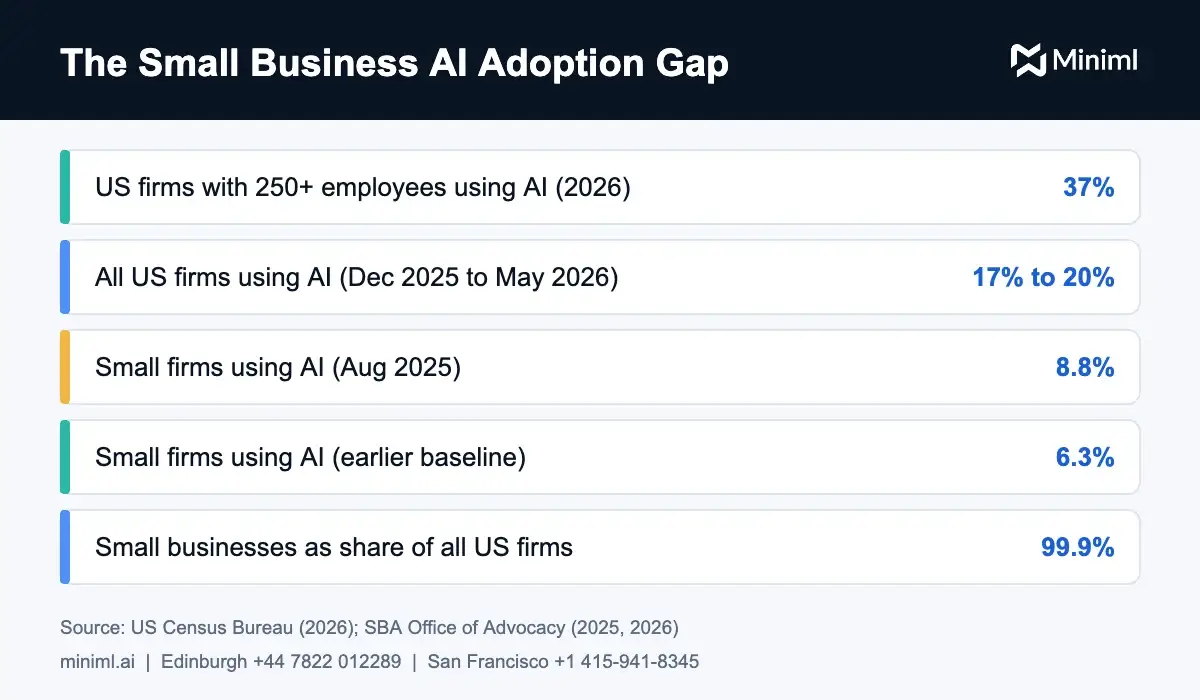
Large companies adopted AI first. A US Census Bureau survey put overall business AI use at 17% to 20% between December 2025 and May 2026, but at 37% for firms with 250 or more employees. Fewer than 20% of firms with four or fewer employees used AI, and use among firms under 20 employees didn’t change much.
The gap is closing, though. The SBA AI research spotlight shows AI use among firms under 250 employees rose from 6.3% to 8.8% by August 2025. Over the same period, the gap with large firms shrank from 1.8x to about 1.1x.
That shift matters at scale. According to SBA small business statistics, the US has 36.2 million small businesses. They make up 99.9% of all firms and employ 62.3 million people, or 45.9% of private-sector workers.
So why do so many owners still hold back on an AI virtual assistant for small business work? The blocker is rarely the model: it’s the lack of a clear first job for the assistant, messy data, and nobody owning the rollout. This guide tackles all three. If you want the general concept first, start with our virtual AI assistant explainer.
What an AI Assistant for Small Business Actually Does
An assistant goes further than a basic chatbot because it works across your tools, not just inside a chat window. We cover the assistant and chatbot differences in a separate post, so here we’ll stay practical. These virtual assistant AI examples show the jobs a well-scoped AI assistant for small business handles today:
- Inbox triage: reads incoming email, tags urgency, and drafts a reply for a person to check and send.
- Quotes and proposals: pulls pricing from your approved sheet and wording from past proposals.
- Scheduling: books, moves, and confirms appointments against your team calendar.
- Staff knowledge help: answers internal questions from policies, process guides, and product docs.
- Bookkeeping prep: extracts totals and dates from receipts and invoices for review before they reach your accounting software.
- Review replies: drafts responses to online reviews in your brand voice.
Each of these tasks shares a pattern: high volume, clear inputs, and a person who can check the output quickly. If a task lacks those three traits, it’s a poor first pick.
Build, Buy, or Configure: Choosing Your Route
Most SMEs have three routes to a working AI assistant for small business use. The right one depends on how unique your data is, how sensitive it is, and how far the workflow strays from standard office work.
| Route | Examples | Best for | Setup effort | Main limits |
|---|---|---|---|---|
| Buy off-the-shelf | Microsoft Copilot, Gemini in Google Workspace | Email, documents, and meetings inside one software suite | Low: days | Generic answers, limited to that suite’s data and actions |
| Configure no-code agents | Agent and workflow builders on top of your existing apps | Simple multi-step tasks across two or three apps | Medium: weeks | Brittle with edge cases, usage fees can climb |
| Build custom | Retrieval-based assistant with your own integrations and permissions | Private knowledge, regulated data, core customer workflows | Higher: weeks to a few months | Needs upfront investment and an internal owner |
Here’s the decision rule we use when scoping. If an off-the-shelf tool handles about 80% of the task inside software you already pay for, buy it. If the gap is mainly connecting apps, configure. Build a custom AI assistant for small business only when it needs your private knowledge base, strict access controls, or actions no vendor supports.
Custom builds usually rest on retrieval-augmented generation, or RAG, a method where the assistant looks up your approved documents before it answers. That lookup layer decides answer quality more than the model does, which is why our knowledge retrieval engineering work starts with your content, not the chat interface.
Which is the best AI assistant for small business teams?
There isn’t a single winner. The best AI assistant for small business is the one that lives where your team already works and can reach the data the task needs. A Microsoft 365 shop should trial Copilot first, and a Google Workspace shop should trial Gemini. Go custom only when neither can see the data or take the action.
A 90-Day Plan to Roll Out an AI Assistant for Small Business
A phased plan keeps risk low and forces a go or no-go decision at each stage. This is the structure we follow when we scope an AI assistant for small business project, and you can run most of it yourself:
- Days 1 to 15, pick one workflow: list your ten most repetitive tasks, note weekly volume and minutes per task, and choose the one with the most hours and the lowest risk.
- Days 16 to 30, audit the data: find where the answers live (CRM, shared drives, inbox, calendar), delete outdated files, and decide who can see what.
- Days 31 to 45, prototype: configure or build a first version, run it against 50 real past examples, and score each answer with the person who does the job today.
- Days 46 to 60, add guardrails: require human approval for refunds, pricing changes, and customer messages, and log every action the assistant takes.
- Days 61 to 75, pilot with a small group: give it to two or three staff, collect every correction, and fix the top failure causes each week.
- Days 76 to 90, measure and decide: compare hours saved and error rates against your baseline, then scale, adjust, or stop.
Don’t skip the stop option. A pilot that proves a task is a bad fit for an AI assistant for small business rollout is a cheap lesson at day 90 and an expensive one at month nine.
What an AI Assistant for Small Business Costs and How to Work Out ROI
Cost follows the route you pick. Off-the-shelf tools are usually a per-user monthly subscription. No-code agents add usage-based fees per task or run. A custom build has an upfront design and engineering cost, plus ongoing hosting, model usage, and maintenance.
Rather than start with a price, work out what the task costs you now. Here’s an illustrative example for a 25-person firm. The inputs are assumptions to show the method, not a benchmark, so swap in your own figures.
| Input | Illustrative value |
|---|---|
| Staff handling routine customer email | 3 people |
| Hours each spends on routine replies per week | 8 hours |
| Share of that work the assistant can draft | 50% |
| Loaded staff cost per hour (your own figure) | $40 |
| Hours freed per week | 12 hours |
| Value of time freed per year (48 working weeks) | $23,040 |
Now compare that yearly value with the full yearly cost of each route, including setup and your own team’s time. If an AI assistant for small business costs more than the hours it frees, don’t buy it, however good the demo looks. Count softer gains like faster response times too, but don’t let them carry the whole case.
Not sure which workflow gives you the best return? We run short scoping sessions that map your tasks, data, and risks before anyone writes code. Book a consultation call and we’ll help you rank your options against real numbers.
Data Privacy and Where Assistants Fail
Protecting customer data in the US and UK
An AI assistant for small business will often touch personal data, so privacy rules apply from day one. In the US, the California Consumer Privacy Act (CCPA) and a growing list of state privacy laws govern how you collect and share personal information. In the UK, UK GDPR requires a lawful basis for processing and data protection by design.
Before you switch anything on, work through this checklist with your vendor or build partner:
- Confirm where the vendor stores and processes your data, and whether it trains models on it.
- Choose business plans that exclude your data from model training.
- Limit the assistant’s access to the folders and records the task needs, nothing more.
- Keep an audit log of what the assistant read, wrote, and sent.
- Update your privacy notice if customers interact with the assistant directly.
Designing for wrong or stale answers
The language model behind any AI assistant for small business can state wrong information with confidence, and a knowledge base goes stale the moment prices or policies change. Plan for both. Ground answers in current documents, show the source with each answer, and tell the assistant to say it doesn’t know and hand over to a person when it can’t find support.
Then give one person ownership of the source content. Stale answers are a process problem, not a model problem, so a monthly content review usually fixes more than a model upgrade.
Finally, set honest expectations with your team. An AI assistant for small business that drafts 50% of routine work and flags the rest is a strong result. One that promises to handle everything tends to lose staff trust within weeks.
AI Assistant for Small Business FAQs
How much does an AI virtual assistant cost for a small business?
Cost depends on the route. Off-the-shelf assistants charge a per-user monthly subscription, no-code agents add usage fees, and custom builds carry an upfront engineering cost plus hosting and maintenance. Price each option against the staff hours it frees every week, and skip any tool that costs more than that time.
Is ChatGPT a virtual assistant?
ChatGPT is a general AI assistant you chat with. On its own, it doesn’t know your customers, calendar, or files, and it can’t act in your business systems unless you connect it. A business assistant adds that data access, user permissions, and approval steps for sensitive actions.
Can I use AI instead of hiring a virtual assistant?
For repetitive, well-defined tasks like inbox triage, scheduling, and first-draft replies, often yes. For judgment calls, relationship work, and anything that needs accountability, a person is still better. Many small firms use AI to absorb the volume so a human assistant can focus on higher-value work.
Should an SME buy an off-the-shelf assistant or build a custom one?
Buy first if a tool inside your current software suite covers most of the task. Build a custom AI assistant for small business use only when it needs private knowledge, strict access controls, or actions no vendor supports.
How long does it take to build an AI assistant?
Configuring an off-the-shelf tool can take days. A focused custom AI assistant for small business build for one workflow usually needs weeks to a few months, depending on data quality and the number of integrations. The 90-day plan above covers scoping, a prototype, a pilot, and a clear go or no-go decision.
Is my customer data safe with an AI assistant?
It can be, if you set it up with care. Use business plans that don’t train on your data, limit access to what the task needs, log every action, and check where the vendor stores data against CCPA, other state privacy laws, and UK GDPR.
Start Your Small Business Assistant With One Workflow
The fastest path to value isn’t the biggest tool. It’s one well-chosen workflow, clean data, clear guardrails, and a firm decision point at day 90. If you’d like help choosing and scoping your first AI assistant for small business project, book a scoping call with Miniml. Call our Edinburgh office on +44 7822 012289 or our San Francisco office on +1 415-941-8345.
About Miniml: Miniml is an AI consultancy with offices in Edinburgh and San Francisco that designs, builds and governs custom AI systems. We help UK and US businesses scope, build, and run AI that fits their data, processes, and risk rules.